

What Is an IMAP Server? Why It Matters for Sales & Marketing in 2026
Have you ever wondered how your sales tools know when to stop following up? The answer lies in the IMAP server. In this guide, we break down what IMAP is, how it differs from SMTP and POP3, and why a stable IMAP connection is the backbone of a successful sales engagement strategy in 2026.
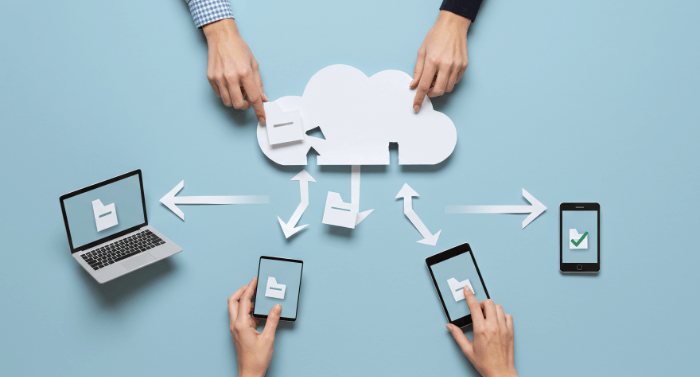
Imagine this scenario: You are a sales representative in 2026. You send a proposal from your laptop in the morning, check for a reply on your phone during lunch, and later, your AI-driven sales engagement platform tries to log the interaction into your CRM.
If all goes well, every device and tool sees the exact same email history. If things go wrong—emails missing on your phone, or your automated follow-up sequence failing to stop after a prospect replies—you likely have an issue with IMAP.
While "IMAP Server" sounds like technical jargon best left to the IT department, understanding it is crucial for modern growth teams. It is the technology that keeps your sales engagement platforms, CRMs, and inboxes in perfect sync.
Here is a plain-English guide to what an IMAP server is and why it is the unsung hero of your sales stack.
What Is an IMAP Server? (The Simple Definition)
IMAP stands for Internet Message Access Protocol.
Think of an IMAP server as a master storage facility for your emails in the cloud. When you check your email (whether via Gmail, Outlook, or a sales tool), you aren't actually downloading the emails to your device and deleting them from the server. Instead, you are just looking through a "window" at the emails stored on the server.
Because the emails stay on the server, you can look through that window from multiple devices (your phone, laptop, tablet) or applications (your CRM, your sales automation tool) simultaneously.
How It Works
- Connection: Your email client connects to the IMAP server.
- Visualization: It displays headers and messages available on the server.
- Synchronization: If you read, delete, or move an email into a folder on your phone, the IMAP server updates that status. When you open your laptop five minutes later, it sees that the email is already read/moved/deleted.
IMAP vs. SMTP: The Dynamic Duo
To understand email infrastructure, you need to know the difference between the two main players:
- SMTP (Simple Mail Transfer Protocol): This is the sending protocol. It is the delivery van that takes your email from your outbox and drives it to the recipient's server.
- IMAP: This is the retrieving protocol. It manages the inbox, syncing incoming mail and organizing folders.
For a sales engagement platform to work, it needs SMTP to send your cold emails and IMAP to "listen" for replies.
Why Sales Engagement Platforms Rely on IMAP
If you are using tools like Lemlist, Outreach, or our own sales engagement platform, connecting your IMAP server is not optional—it’s critical. Here is why:
1. The "Stop-on-Reply" Functionality
The golden rule of automated outreach is: If a prospect replies, stop the automated follow-ups. Your sales tool uses IMAP to constantly scan your inbox. When it detects a reply from a prospect, it uses that signal to pause the campaign. Without a stable IMAP connection, the tool is blind. It won't see the reply, and it might send an awkward "Just bumping this up" email to a prospect who already said, "Let's meet Tuesday."
2. CRM Logging
Modern sales teams don't manually copy-paste emails into Salesforce or HubSpot. Your tools use IMAP to sync your sent and received emails directly to the contact's profile in your CRM.
3. Deliverability and Reputation
While IMAP doesn't send emails, it protects your domain reputation. By ensuring you never spam someone who has already engaged with you (because IMAP detected the reply), you reduce spam complaints and keep your domain healthy.
IMAP vs. POP3: Why POP3 is Obsolete for Sales
You might see another option called POP3 (Post Office Protocol) when setting up email. Avoid this for sales workflows.
- POP3 works like a real-life mailbox: once you take the mail out (download it to one device), it is gone from the box (the server).
- The Problem: If you download an email to your phone using POP3, it might vanish from your laptop. Your sales engagement tool won’t be able to find it to track replies.
In 2026, where multi-device work is the standard, POP3 creates data silos. IMAP creates a unified workspace.
Best Practices for IMAP in 2026
As security standards tighten, here is how to ensure your IMAP setup supports your sales efforts:
1. Use OAuth 2.0
In the past, you simply typed your email and password into your sales tool. Today, major providers (Google Workspace, Microsoft 365) prefer OAuth. This is a secure token method ("Sign in with Google") that grants your sales tool access to IMAP without sharing your actual password. Always choose this option if available.
2. Watch Your "App Passwords"
If you aren't using OAuth, you may need an "App Password" (a specific passcode generated inside your email account settings) to allow third-party tools to access IMAP.
3. Folder Syncing
Ensure your sales tool has access to the correct folders. Sometimes, emails land in "Promotions" or custom folders. A properly configured IMAP connection ensures your tool scans all relevant folders for replies, not just the primary inbox.
Conclusion
You don't need to be a systems administrator to succeed in sales, but you do need to understand the tools that power your revenue engine. The IMAP server is the bridge that connects your manual efforts with your automated tools.
By ensuring your IMAP settings are correct and secure, you ensure that no lead gets left behind, no awkward follow-ups get sent, and your sales team operates as a synchronized unit—no matter where they are working from.